Secret Codes & Device Info
- 4.3
- Rating
- 50.00K
- Installs
- Free
- Price

 Analysis by App-foxy
I installed Secret Codes & Mobile Hacks expecting a compact reference for Android phone codes, and that is exactly the kind of experience it aims to provide. It belongs to the Libraries & Demo section, comes from AcmeSoft, and is free to install. The basic idea is simple: instead of searching the web whenever I want to check a phone code, I can keep a dedicated collection close at hand and browse it from one place.
That simplicity is both the app’s appeal and its biggest test. A secret-code reference can feel surprisingly useful during the first few days, especially if I enjoy exploring Android settings or helping family members with their phones. The harder question is whether it deserves a permanent place on the home screen after the curiosity wears off. My experience is that it can earn that space for the right kind of user, but it is not automatically a daily-use tool for everyone.
What the first week feels like
The first week is when this app makes its strongest impression. The phrase “secret codes” naturally creates curiosity, and opening a library of codes encourages experimentation. I found myself thinking of situations where a code might be more convenient than navigating through several layers of Android settings. That makes the app feel more practical than a random collection of tricks: it turns an unfamiliar part of phone maintenance into something I can consult quickly.
You May Also Like

 Blood Strike: 2.5 Anniversary
Blood Strike’s Loadouts Turn Every Drop Into a Tactical Gamble
A close look at Blood Strike’s custom loadouts: how fast access to signature weapons reshapes its battle royale rhythm, rewards preparation, and narrows the gap between fights.

 Pandora - Music & Podcasts
Pandora’s Music Is Easy to Start, but Harder to Recover
Pandora’s strength is its low-effort path from a seed to a station. Its weak spot is how much confidence it asks you to place in connection, setup, and quiet recovery.

 8 Ball Pool
 Is Built on Rivalries, Rematches, and Routine
A close look at the rivalries, rematches, shared routines, and unanswered safety questions that turn a quick pool match into a persistent mobile community.

 Samsung Music
’s Quiet Strength Is Playing What You Already Own
Its reach comes less from spectacle than from dependable access to a personal library. That simplicity is both the app’s strongest retention engine and its ceiling.

 AccuWeather: Weather Radar
AccuWeather Review: A Quick, Clear Forecast for Everyday Decisions
For everyday plans, the best forecast is the one you can understand quickly. AccuWeather makes rain timing, radar, and local conditions easy to act on, with a few trade-offs.

 Hill Climb Racing
Why Hill Climb Racing Still Turns Crashes Into One More Run
A tiny car, a bumpy hill and one more upgrade: Hill Climb Racing keeps resurfacing because its simple chaos makes every near-miss feel personal.
More From Our News Desk
View All News


The most useful way to approach it is as a reference rather than as a magic toolbox. A code is not valuable merely because it looks hidden. Its usefulness depends on the phone model, Android build, manufacturer customizations, carrier behavior, and the purpose of the code itself. I would not treat every entry as universally applicable, and I would avoid entering anything I do not understand. The app is best used to identify a possible route, then pause and consider what the command may change or display.
That distinction is important for newcomers. Someone who expects one tap to unlock dramatic hidden powers may find the experience underwhelming. Someone who wants a more organized way to learn about Android diagnostics and device information will probably get more from it. I like that the concept encourages curiosity without requiring a technical background, although responsible use still matters because some phone menus can expose settings that are better left untouched.
In an everyday scenario, I can imagine using it while helping a relative troubleshoot a phone. Instead of asking them to install several diagnostic utilities or forwarding a search result with unclear instructions, I could consult the reference, identify the relevant code, and compare the result with the phone’s ordinary settings. It is also useful when checking whether a device offers a particular diagnostic screen before spending time looking through menus that may not exist on that model.
The app supports Android devices running at least version 7.0, which gives it a broad potential audience among people using older phones as well as newer ones. That does not mean every code will behave the same way across those devices. Android’s long history of manufacturer-specific changes makes compatibility a practical concern, so I would keep expectations flexible rather than assuming an entry will work simply because the operating system is supported.
Its age rating is Everyone, which fits the reference-library concept. Still, an Everyone rating should not be confused with “every action is risk-free.” The app may be suitable for a wide range of users, but I would explain each step to a child or less technical family member instead of handing over the phone and encouraging random testing. The safest habit is to read first, use only a code relevant to a clear purpose, and stop if the result is unclear.
How I would use it without turning the phone into a test device
My preferred workflow is deliberately cautious. First, I define what I am trying to learn: device information, a diagnostic screen, or a particular network-related detail. Then I look for a matching entry instead of browsing aimlessly. Before entering anything, I check whether the action appears informational or potentially changes a setting. Finally, I record what I saw and return to the normal phone interface rather than continuing just because another code is available.
This approach reveals one of the app’s non-obvious strengths: it can act as a learning aid. The value is not only in individual codes, but in helping me understand that Android phones have layers beyond the visible settings menus. For a student, repair hobbyist, or technically curious owner, that context can be more rewarding than a one-time shortcut. The trade-off is that the app does not replace a proper troubleshooting guide when a phone has a serious fault.
I also recommend using it alongside the phone’s built-in settings, not instead of them. Standard menus usually explain what a setting does and provide safer navigation. The code library is more useful when a particular screen is difficult to locate or when I want to compare the manufacturer’s visible options with a deeper diagnostic view. For routine tasks such as changing display behavior, managing accounts, or checking storage, the regular settings app remains the clearer choice.
Does it keep earning space after the novelty?
After the first burst of exploration, the app’s value becomes more occasional. I do not expect to open a secret-code reference every day, and pretending otherwise would make the review less honest. Its month-to-month usefulness depends on whether I regularly manage several Android phones, troubleshoot devices for other people, or enjoy learning how different handsets expose diagnostic information.
For a single phone that works reliably, the app may spend long periods unopened. That is not necessarily a flaw; reference tools often matter most when a specific need appears. The question is whether keeping it installed is less effort than searching for a trustworthy code list when that need arrives. Because the app is free to install, the decision is easier for a curious user who has enough storage and does not mind an occasional specialist tool sitting quietly in the app drawer.
The developer is AcmeSoft, and the current version is 1.12. I would pay attention to updates over time because this type of app has a particular maintenance challenge: phone software changes, manufacturers remove or restrict older commands, and codes that once worked may become irrelevant. A reference app earns long-term trust only when its contents remain useful as devices evolve. I would therefore treat the version number as a reason to check for freshness, not as proof that every entry applies to my handset.
The app has passed the ten-thousand-install mark, while its average rating is currently zero point zero. Those figures create a mixed impression for me. The install count suggests that the concept has reached a real audience, but the rating does not give me the reassurance I normally want before relying on a utility. I would test it conservatively and judge it by whether the entries are understandable and relevant to my own device, rather than assuming popularity guarantees accuracy.
Another practical question is cost. The app is free, but it includes in-app purchases ranging from two dollars and forty-nine cents to nineteen dollars and ninety-nine cents per item. That makes the free entry point important: I would explore the available material before paying for anything. A purchase may be reasonable for someone who uses the reference professionally or frequently, but an occasional user should compare the added value with the fact that many basic phone checks can already be handled through Android’s own menus.
This pricing structure also affects long-term value. If I only want to satisfy a short-lived curiosity, paying for expanded material may not make sense. If I repeatedly support phones for relatives, manage devices at a small workplace, or use Android as a hobby, a broader reference could save time. I would still want a clear understanding of what an item adds before committing, because the benefit of a code library depends more on relevance and accuracy than on sheer size.
What maintenance really involves
The maintenance burden is light in the ordinary sense: I do not need to create an account, build a collection, or perform a complicated setup just to consult the app. The heavier burden is intellectual. I have to remember that a code is not a universal command, that a result can differ between manufacturers, and that a diagnostic screen may show information without solving the underlying issue.
That means I would keep a simple personal rule: never use a code as a substitute for a backup, a manual, or a repair professional when the action could affect important data or connectivity. I would also avoid testing entries on someone else’s phone without their permission. This is a small but meaningful distinction between responsible reference use and casual experimentation. The app itself may make discovery easy, but I remain responsible for deciding whether a particular action is appropriate.
A second maintenance habit is to remove outdated expectations. If a code does nothing, that does not automatically mean the app is broken; the phone may not support it, the carrier may block it, or the manufacturer may have changed the relevant interface. I would record the device model and Android version when I test something, then avoid repeatedly trying the same entry. That prevents a frustrating loop and gives me a better basis for deciding whether the app is useful on that phone.
For people who service multiple devices, the app can become more valuable if used as a starting index. I would keep notes outside the app about which codes worked on which phones, because personal compatibility knowledge becomes more useful over time than a generic list. This is one of the strongest long-term workflows I can see: the application supplies discovery, while my own notes turn it into a practical device-specific reference.
Where fatigue starts to appear
The first source of fatigue is uncertainty. Secret codes sound precise, but the real-world result may depend on the handset. When an entry fails or opens something unexpected, the experience can shift from convenient to confusing. Users who prefer clear, guided instructions may be happier with the manufacturer’s support app or Android’s standard settings, where each option is presented in a more controlled context.
The second source is repetition. Once I have explored the entries that relate to my own phone, many remaining items may have little immediate relevance. A library can feel large at first, but its recurring value is determined by how often I encounter a compatible use case. Without a specific troubleshooting goal, browsing can become a loop of opening codes, wondering what they do, and closing the app again.
There is also a trust issue around the word “hacks.” I would interpret it as shortcuts and lesser-known access methods, not as a promise of bypassing security or gaining capabilities a phone does not support. That expectation matters. Anyone looking for unauthorized access, password recovery, or a way around device protections should skip this app and use legitimate recovery or support channels instead.
Compared with a web search, the app’s advantage is focus. A search engine may return outdated pages, contradictory instructions, or results aimed at a different phone. A dedicated reference is less distracting and easier to consult when I already know the kind of information I need. The disadvantage is that web results can provide model-specific explanations, user reports, and troubleshooting context that a compact library may not offer. For unusual devices, I would use both: the app to discover a possible code and reputable documentation to verify it.
Compared with dedicated diagnostic apps, this tool is narrower but potentially less cluttered. A full diagnostic utility may present live hardware tests, battery details, sensors, or guided reports, while a code reference is more about access to commands and information. If my goal is to measure a battery’s condition or check sensors in a structured way, I would choose a purpose-built diagnostic tool. If I want to learn which hidden phone screen might be relevant, this app is the more direct starting point.
Compared with manufacturer support tools, Secret Codes & Mobile Hacks is more exploratory and less tailored. Official support software is usually preferable when I need warranty guidance, model-specific repair steps, or a safe reset process. This app makes more sense when I want a general Android reference and understand that compatibility will vary. That trade-off is central to deciding whether it belongs in my regular toolkit.
Who should keep it installed?
I would recommend keeping it for Android enthusiasts, repair learners, family tech helpers, and anyone who regularly moves between different phones. These users can turn occasional discoveries into a repeatable workflow. The app is also a reasonable choice for someone who enjoys understanding the less visible parts of Android and is willing to verify an action before using it.
I would skip it if I want a polished, guided troubleshooting assistant. It is also a poor fit for someone who rarely changes phones, never investigates technical issues, or expects every listed code to work identically everywhere. In those cases, the standard settings app, official manufacturer documentation, or a focused diagnostic utility will probably be less frustrating and more useful.
My final view is cautiously positive. The lasting value comes from having a focused reference available at the moment a specific Android question appears, not from opening it every day. The free installation makes that occasional usefulness easy to test, while the Everyone rating keeps the audience broad. At the same time, the zero-point-zero average rating gives me no reason to rely on it blindly, and the paid items make it sensible to establish a real need before spending money.
After the novelty fades, I would not call this an essential app for every Android owner. I would call it a handy specialist reference with a clear place in the toolbox of a curious or technically involved user. If I install it, I would keep my expectations realistic, use it alongside ordinary Android settings, verify device compatibility, and avoid treating hidden menus as guaranteed fixes. Used that way, Secret Codes & Mobile Hacks can remain useful for months without demanding much attention; used as a collection of magical shortcuts, it is likely to become another forgotten download.
FAQs for Secret Codes & Device Info
01What is Secret Codes & Mobile Hacks?
Secret Codes & Mobile Hacks is an app designed to provide users with a comprehensive collection of secret codes and hacks that can be used on their mobile phones. These codes can unlock hidden features, enhance phone performance, and provide valuable insights into device functionality. It's a tool for both Android and iOS users looking to optimize their mobile experience.
02How does Secret Codes & Mobile Hacks work?
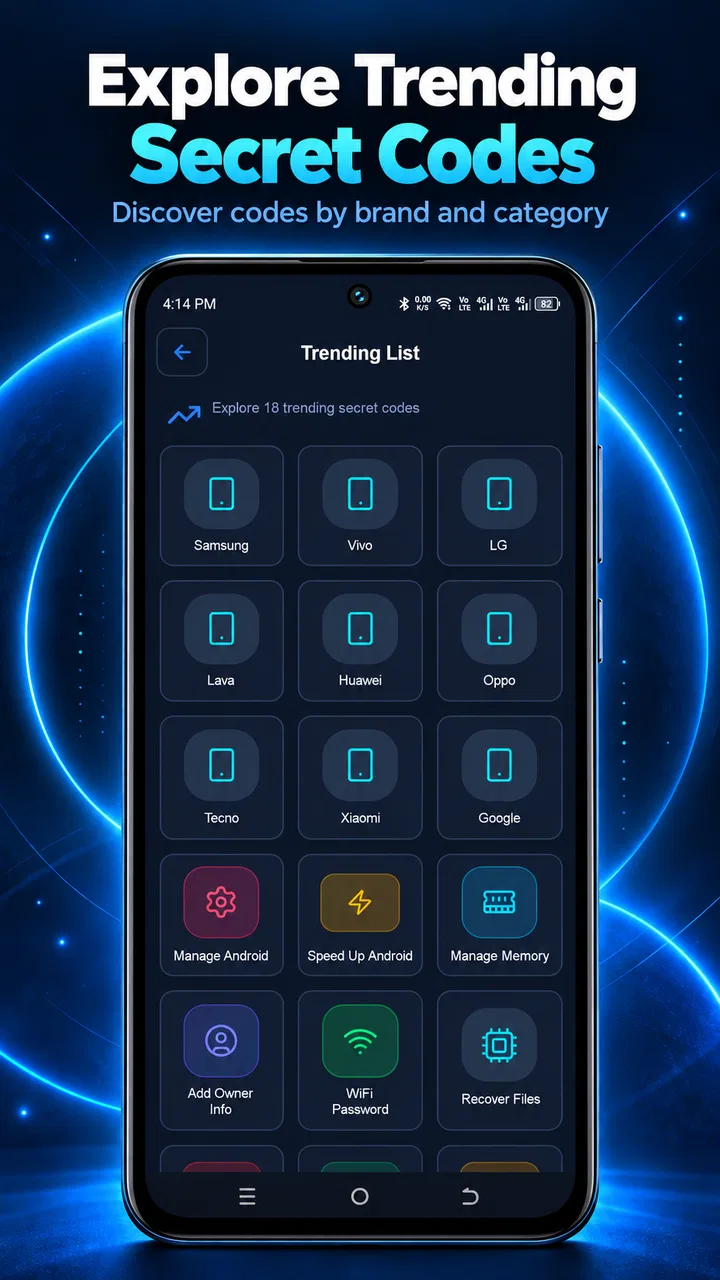
The app works by offering a database of secret codes that users can input on their devices to access hidden menus and features. These codes are typically entered via the phone's dial pad. The app categorizes these codes based on device type and manufacturer, making it easy for users to find relevant codes for their specific phone model.
03Is Secret Codes & Mobile Hacks safe to use?
Yes, Secret Codes & Mobile Hacks is safe, provided you use it responsibly. The app itself does not modify device software or settings. However, users should be cautious when using certain codes, as they can alter important settings or data. It's recommended to back up your data before using any advanced codes.
04Do I need technical knowledge to use Secret Codes & Mobile Hacks?
No, you don't need technical expertise to use the app. Secret Codes & Mobile Hacks is designed for users of all skill levels, providing clear instructions for each code's use. However, understanding the potential impact of certain codes can be helpful. The app includes descriptions and warnings where necessary to guide users.
05Is Secret Codes & Mobile Hacks compatible with my device?
The app is compatible with a wide range of Android and iOS devices. It supports most major smartphone manufacturers, including Samsung, Huawei, LG, and more. Compatibility details can be found within the app, which categorizes codes by device and OS version to ensure users can find relevant information for their specific phone.
Pros
- Easy to navigate interface.
- Comprehensive code database.
- Regular updates with new info.
- Works offline seamlessly.
- User-friendly design.
Cons
- Contains ads that can be intrusive.
- Limited support for older devices.
- Some codes may not work universally.
- No customization for notifications.
- Requires initial setup for full features.

Secret Codes & Device Info
Gallery